
Web Development
What is a URL? The Ultimate Guide with Real Examples
Demystify the Uniform Resource Locator (URL). Learn what a URL is, how its components work, and see real-world examples explained by industry experts.

 Hover to zoom
Every time you check your email, watch a video, or look up a recipe, your browser relies on a single string of text to find exactly what you need. That string is a URL. But what is a URL, and how does it actually work under the hood? If you have ever wondered how a simple line of characters connects you to remote servers across the globe, you are in the right place.
At Squarebrackets, we teach our full-stack development students that mastering the web starts with understanding its foundational building blocks. Before you spin up custom backends like we explore in our guide on What Is a Server? Types, Web Servers, and Node.js Setup or query databases in our SQL (Structured Query Language) Training, you need to know how clients reach them. A URL is not just an address you type into Chrome; it is a structured set of instructions that tells your computer how to communicate with remote servers.
What is a URL (Uniform Resource Locator)?
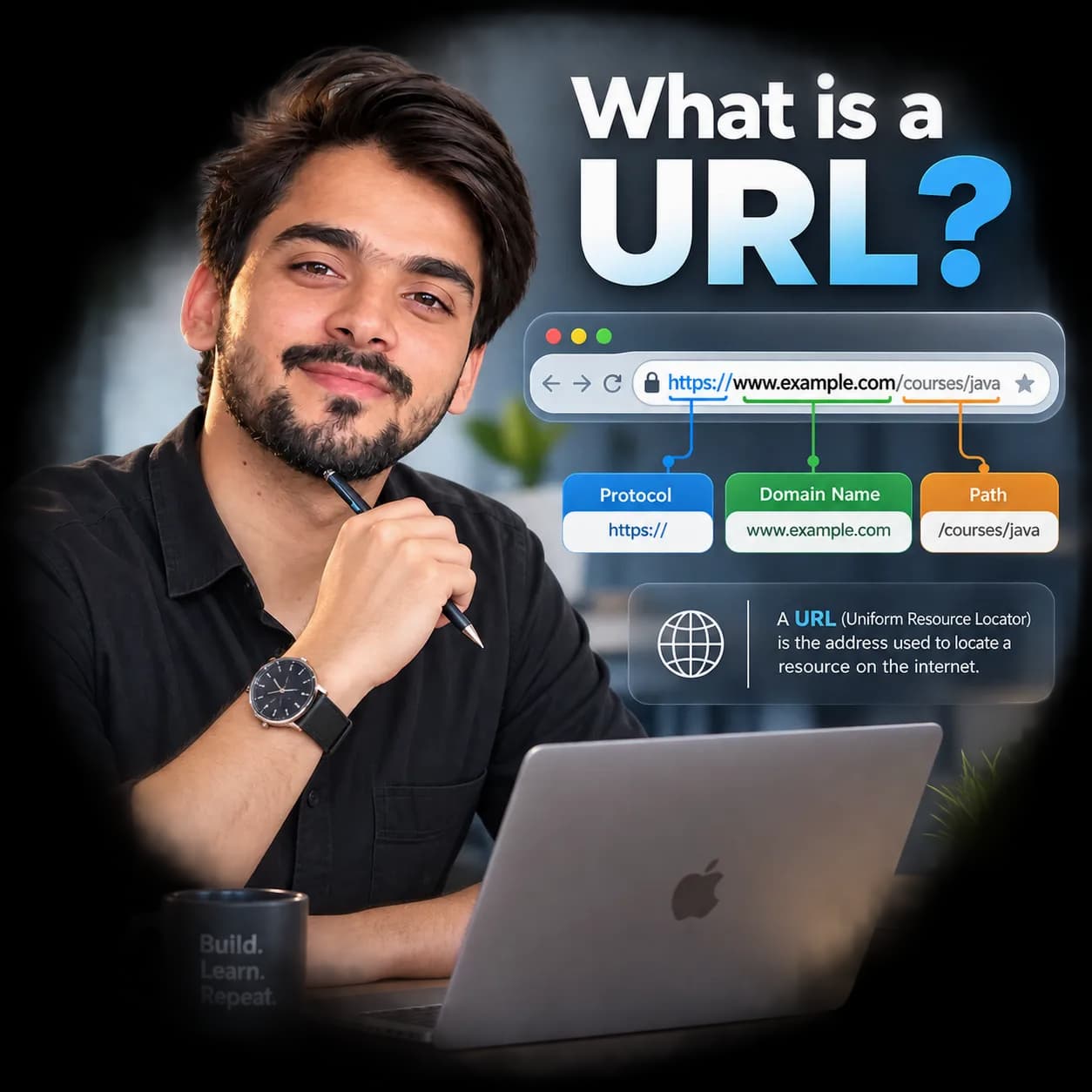
A Uniform Resource Locator (URL) is a specific type of web address that identifies a resource on the internet and specifies the mechanism, or protocol, used to retrieve it. Think of the internet as a massive global city. If a web server is a building, the URL is the complete mailing address, including the country, city, street name, and room number, needed to deliver a package.
While we naturally associate URLs with websites, they also point to raw files, database exports, images, video streams, and REST API endpoints. Without URLs, we would have to memorize complex, shifting numerical IP addresses to access anything online.
The Anatomy of a URL: Breaking Down the Components
A URL looks like a single continuous line of text, but it is actually a modular construct where each segment has a distinct job. Let us examine a complete, complex URL to see how it is put together across production environments.
https://www.squarebrackets.in:443/courses/java-full-stack?batch=weekend&discount=true#curriculumHere is what each of those parts represents, starting from the left:
- Protocol/Scheme (https://): This tells the browser how to transfer data. HTTPS is the secure standard, while HTTP is the older, unencrypted version. Other protocols include ftp:// for file transfers and mailto: for sending emails.
- Subdomain (www.): A subdivision of the main domain. While 'www' is traditional, subdomains can be anything, such as 'blog.squarebrackets.in' or 'portal.squarebrackets.in'.
- Domain Name (squarebrackets.in): The human-readable name of the website. It maps directly to an IP address behind the scenes using the Domain Name System (DNS).
- Port (:443): The gate or communication channel on the server. Web servers default to port 80 for HTTP and port 443 for HTTPS, which is why you rarely see this part typed out in your browser.
- Path (/courses/java-full-stack): The specific folder or file structure on the server where the resource resides, much like folders on your local computer.
- Query Parameters (?batch=weekend&discount=true): Key-value pairs that provide extra information to the server. They start with a question mark (?) and are separated by ampersands (&).
- Fragment Identifier (#curriculum): Points to a specific anchor or section within the webpage itself, telling the browser to scroll directly to that spot.
How Does a URL Work Behind the Scenes?
- DNS Lookup: Your browser does not know what 'squarebrackets.in' means. It contacts a Domain Name System (DNS) server to translate that domain name into a machine-readable IP address, like 192.0.2.1.
- Connection Establishment: The browser initiates a TCP/IP connection with the server at that IP address, usually over port 443 for secure connections.
- HTTP Request: The browser sends a request to the server, asking for the resource specified in the URL's path, such as /courses/java-full-stack.
- Server Processing: The server reads the request, processes any query parameters, and locates the requested files or generates them using a backend database.
- HTTP Response: The server sends the resource back to the browser along with a status code like 200 OK or 404 Not Found.
- Rendering: Your browser reads the received files and renders them into the visual, interactive webpage you see on your screen.
URL vs URI vs URN: What is the Difference?
These three acronyms are frequently confused, even by junior software developers. Let us clear up the confusion once and for all. The easiest way to think about it is that a URI is the parent category, while URLs and URNs are its children.
| URL (Locator) | URN (Name) | |
|---|---|---|
| Primary Purpose | Identifies a resource by describing its location and how to access it. | Identifies a resource by its unique name, regardless of its location. |
| Example | https://www.squarebrackets.in/blog/index.html | urn:isbn:978-0-13-235088-4 (Book identifier) |
| Dependence | If the resource moves to a new domain or folder, the URL breaks. | Remains valid even if the resource moves or the server goes offline. |
| Web Browser Use | Directly usable by browsers to load web pages. | Requires a resolver to locate and retrieve the actual file. |
Why URL Encoding Matters in Web Development
URLs can only be sent over the internet using the strict ASCII character set. Because of this, certain characters like spaces, brackets, or non-English letters cannot be included directly in a URL. They must be converted into a valid ASCII format using percent-encoding before transmission.
What Changes at Scale and in Production?
In local development, a URL usually points directly to localhost:3000 or a single development server. In production, however, URLs pass through multiple layers of infrastructure before hitting your application code. Load balancers, reverse proxies like Nginx, and content delivery networks manipulate and inspect URLs constantly.
Security teams also monitor URL patterns closely to protect against injection attacks, path traversal, and malicious query strings. Keeping your routing logic clean, sanitising input parameters, and enforcing HTTPS redirection are standard practices for engineers building robust systems.
Where to go from here
Now that you understand how URLs work from end to end, you are ready to start building the backends that respond to them. Explore our comprehensive Java Full Stack with Microservices & GenAI program to learn how modern web applications route traffic, handle requests, and serve production clients.