

Web Development
What is Redis? A Simple Guide with Java, Node & Python Examples
A beginner-friendly guide to Redis: what it is, what it does, its pros and cons, how to set it up, and how to use it with Java, Node.js, and Python.

 Hover to zoom
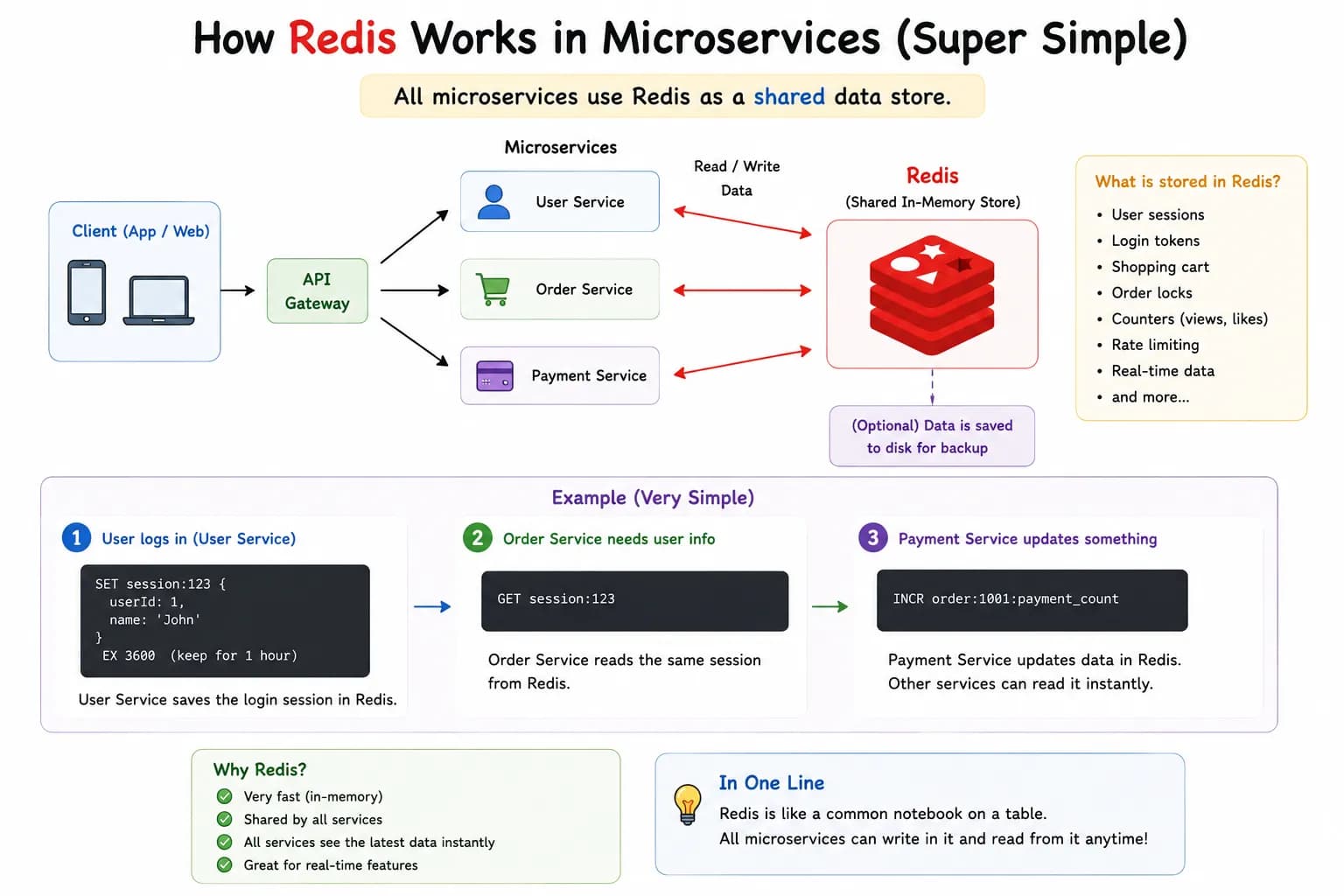
If you have been building apps, you have probably heard that Redis can make things faster. But what exactly is Redis, what does it do, and how do you actually use it in your code? This guide explains Redis in plain, simple language, covers its pros and cons, shows you how to set it up, and gives you ready-to-run examples in Java, Node.js, and Python.
What is Redis? (in simple words)
Redis (short for Remote Dictionary Server) is an open-source, in-memory data store. The simplest way to picture it is a giant dictionary that lives in memory: you give it a key, and it instantly gives you back the value. Because everything is stored in RAM rather than on a hard disk, Redis can read and write data in microseconds, far faster than a traditional database. Redis stores data as key-value pairs, but the values can be much more than plain text. They can be lists, sets, hashes, and more, which makes Redis flexible enough for many different jobs.
What does Redis do? (main uses)
- Caching: storing the results of slow operations so you do not have to repeat them. This is the number one use of Redis.
- Session storage: remembering who is logged in across many servers
- Real-time leaderboards and rankings: using sorted sets to rank players or items by score.
- Queues and background jobs: passing tasks between parts of your app.
- Pub/Sub messaging: sending live updates, like chat messages or notifications.
- Rate limiting: counting requests to stop abuse of an API
A real-life example
Imagine a busy library. Every time someone asks for a popular book, a librarian walks all the way to the back storage room to fetch it. That trip is slow. Now imagine the librarian keeps the most-requested books on a small shelf right at the front desk. The next person who wants that book gets it instantly. Redis is that front-desk shelf, and your main database is the back storage room. Instead of asking the slow database again and again for the same data, your app keeps a copy in Redis and serves it instantly. That is caching, and it is the main reason Redis makes apps feel fast.
Redis data types
| What it stores | Example use | |
|---|---|---|
| String | Text or numbers | Caching a value, counters |
| List | An ordered list of items | Queues, recent activity feeds |
| Set | Unique items, no order | Tags, tracking unique visitors |
| Hash | Field-value pairs, like an object | User profile or session data |
| Sorted Set | Items ranked by a score | Leaderboards, top-rated items |
| Stream | A log of events in order | Real-time data, event processing |
Pros and cons of Redis
Pros
- Extremely fast, because data lives in memory (RAM).
- Simple key-value model that is easy to learn.
- Flexible data types: strings, lists, sets, hashes, and sorted sets.
- Built-in key expiry, so cached data can auto-delete after a set time.
- Pub/Sub support for real-time messaging.
- Works with almost every language, including Java, Node.js, and Python.
Cons
- Data is stored in RAM, which is more expensive and more limited than disk.
- Not ideal as the only database for large, complex, relational data.
- Without persistence configured, recent data can be lost if the server crashes
- No rich querying like SQL: no joins, and only limited search.
- Keeping a cache in sync with your main database adds some complexity.
How to set up Redis
You can run Redis locally, in Docker, or use a managed cloud service. Here are the quickest ways to get started.
Install on macOS
brew install redis
brew services start redis
Install on Ubuntu / Linux
sudo apt update
sudo apt install redis-server
sudo systemctl start redis
Run with Docker (any OS, including Windows)
docker run -d --name redis -p 6379:6379 redisCheck that Redis is running
redis-cli pingHow to use Redis with Java
For Java, the most popular client is Jedis. First add the Jedis dependency to your project (for example, in your Maven pom.xml), then connect and run commands.
import redis.clients.jedis.Jedis;

public class RedisExample {
    public static void main(String[] args) {
        // Connect to Redis running on localhost:6379
        try (Jedis jedis = new Jedis("localhost", 6379)) {

            // Store a value
            jedis.set("name", "Squarebrackets");

            // Read the value back
            String value = jedis.get("name");
            System.out.println("Stored value: " + value);

            // Cache a session key that expires after 10 seconds
            jedis.setex("session:101", 10, "active");
        }
    }
}
This connects to Redis on localhost, stores a value, reads it back, and shows how to set a key that automatically expires after 10 seconds, which is perfect for caching.
How to use Redis with Node.js
For Node.js, use the official node-redis library. Install it with npm install redis, then connect and use simple async commands.
// Install first:  npm install redis
const { createClient } = require("redis");

async function main() {
  const client = createClient(); // connects to localhost:6379 by default
  client.on("error", (err) => console.log("Redis error:", err));

  await client.connect();

  // Store and read a value
  await client.set("name", "Squarebrackets");
  const value = await client.get("name");
  console.log("Stored value:", value);

  // Cache a session key that expires after 10 seconds
  await client.set("session:101", "active", { EX: 10 });

  await client.quit();
}

main();
Here the client connects to Redis, sets and gets a value, and stores a session key that auto-expires after 10 seconds.
How to use Redis with Python
For Python, the standard client is redis-py. Install it with pip install redis, then connect and run commands.
# Install first:  pip install redis
import redis

# Connect to Redis on localhost:6379
r = redis.Redis(host="localhost", port=6379, decode_responses=True)

# Store and read a value
r.set("name", "Squarebrackets")
value = r.get("name")
print("Stored value:", value)

# Cache a session key that expires after 10 seconds
r.setex("session:101", 10, "active")
Setting decode_responses=True tells Redis to return normal strings instead of raw bytes, which is easier to read.
When should you use Redis?
Tools
Redis, Redis CLI, Docker, Jedis (Java), node-redis (Node.js), redis-py (Python)