
AI/Automation
LangChain vs LangGraph vs LangSmith: Which One Do You Need?
Confused between LangChain, LangGraph, and LangSmith? Discover what each tool does, how they work together, and which one you need for your AI project.
 Hover to zoom
If you are building applications with Large Language Models (LLMs), you have likely run into the LangChain ecosystem. What started as a simple Python library for chaining prompts has exploded into a massive suite of tools. Now, developers face a common point of confusion when evaluating langchain vs langgraph vs langsmith. You do not want to over-engineer your application, yet you cannot afford to build a system that breaks the moment it hits production.
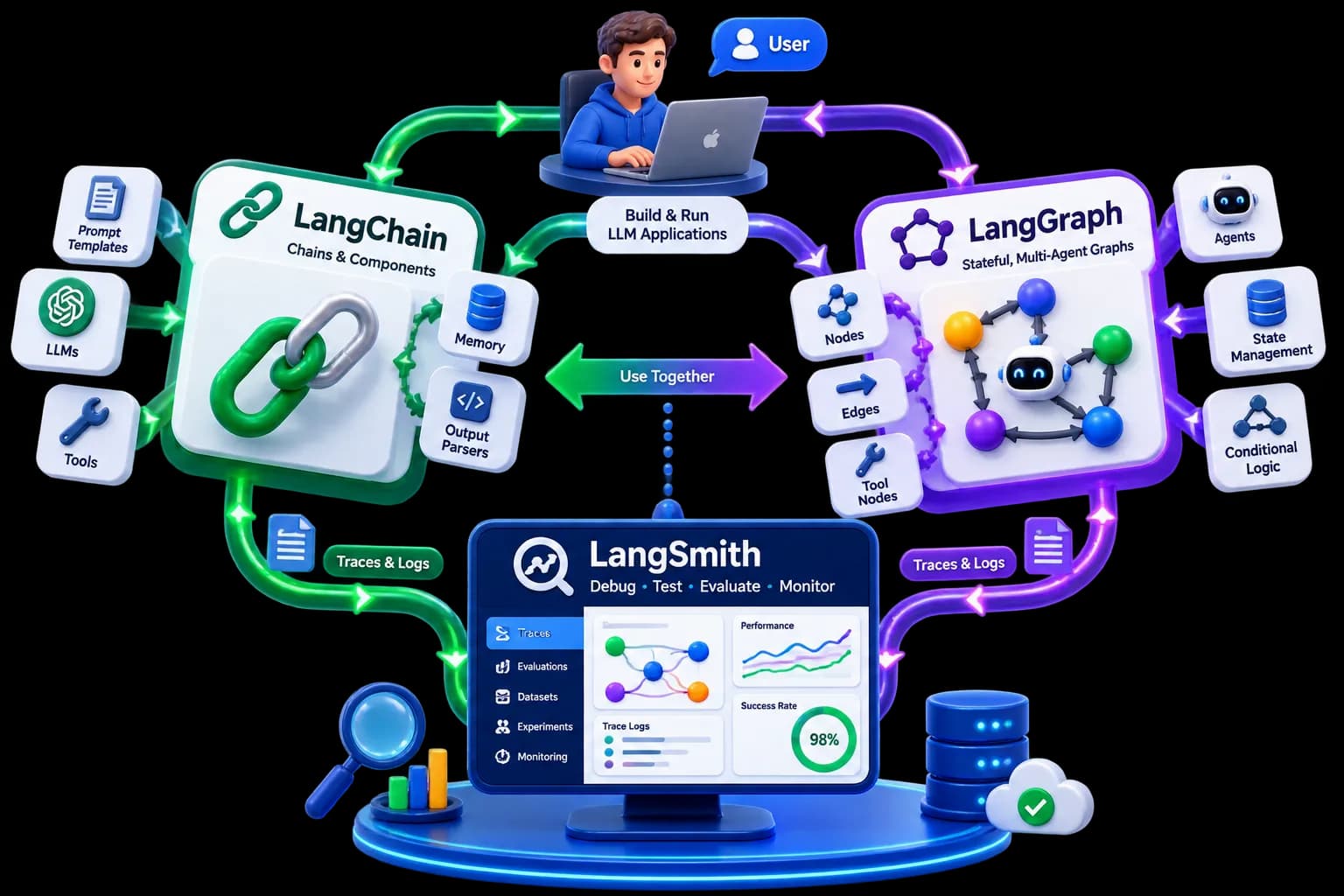
At Squarebrackets , our AI courses frequently address this exact dilemma. Students often ask if they need to learn all three tools, or if one can replace the others. The short answer is: they are not competitors. They are complementary pieces of a unified AI development stack designed for different stages of your application's lifecycle. Let's break down exactly what each tool does, how they differ, and which one your project actually needs.
What is LangChain?
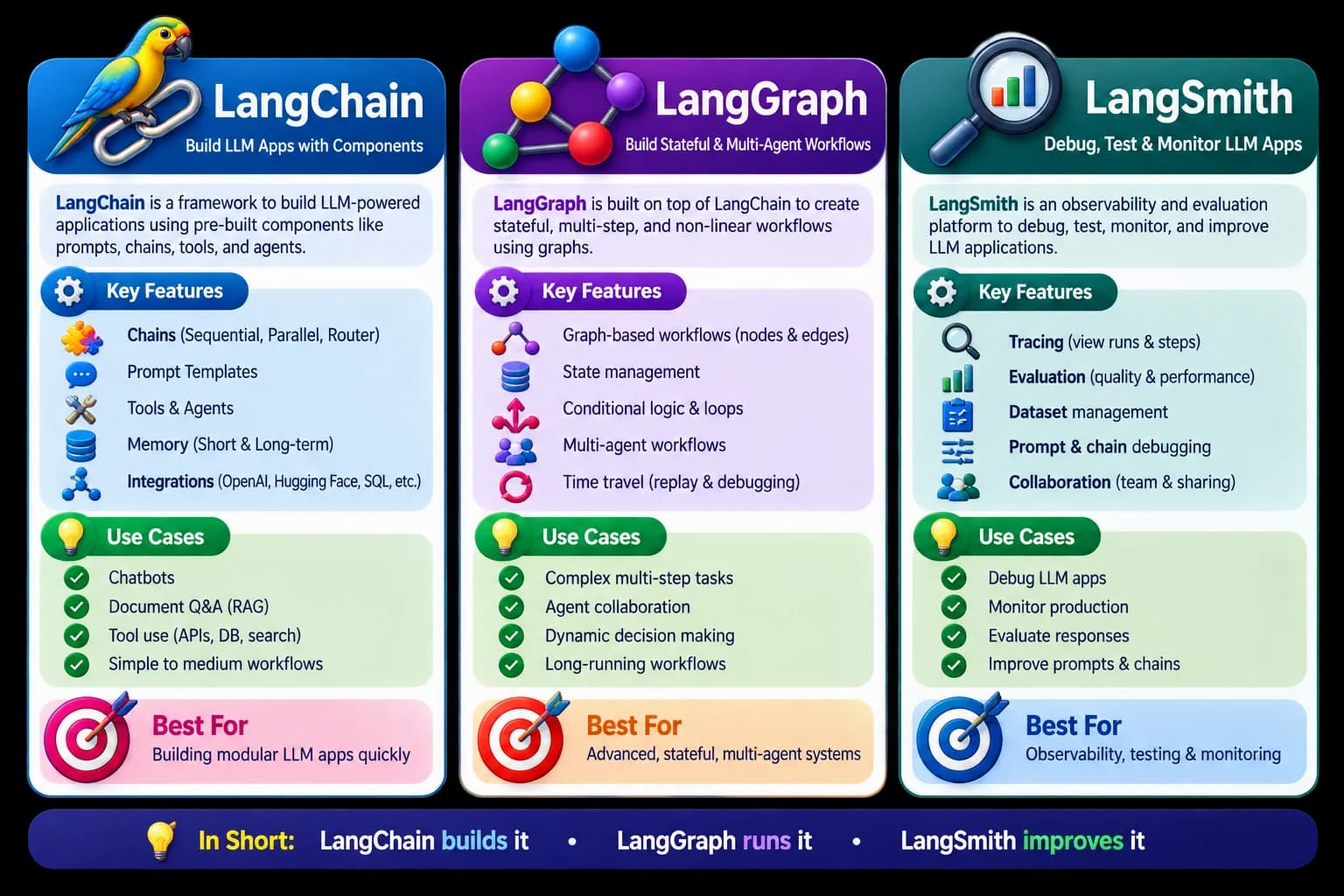
LangChain is an open-source framework designed to simplify the creation of applications using LLMs. Think of it as the foundational toolkit. It provides standardized abstractions for components you need in almost every AI app: prompt templates, LLM wrappers (like OpenAI, Claude, or Llama), vector database integrations, and output parsers.
In the early days of generative AI, you had to write custom API calls for every model and manually handle chat histories. LangChain solved this by introducing "chains"—linear sequences of operations where the output of one step becomes the input of the next. It is excellent for straightforward pipelines like a standard Retrieval-Augmented Generation (RAG) chatbot or a document summarizer.
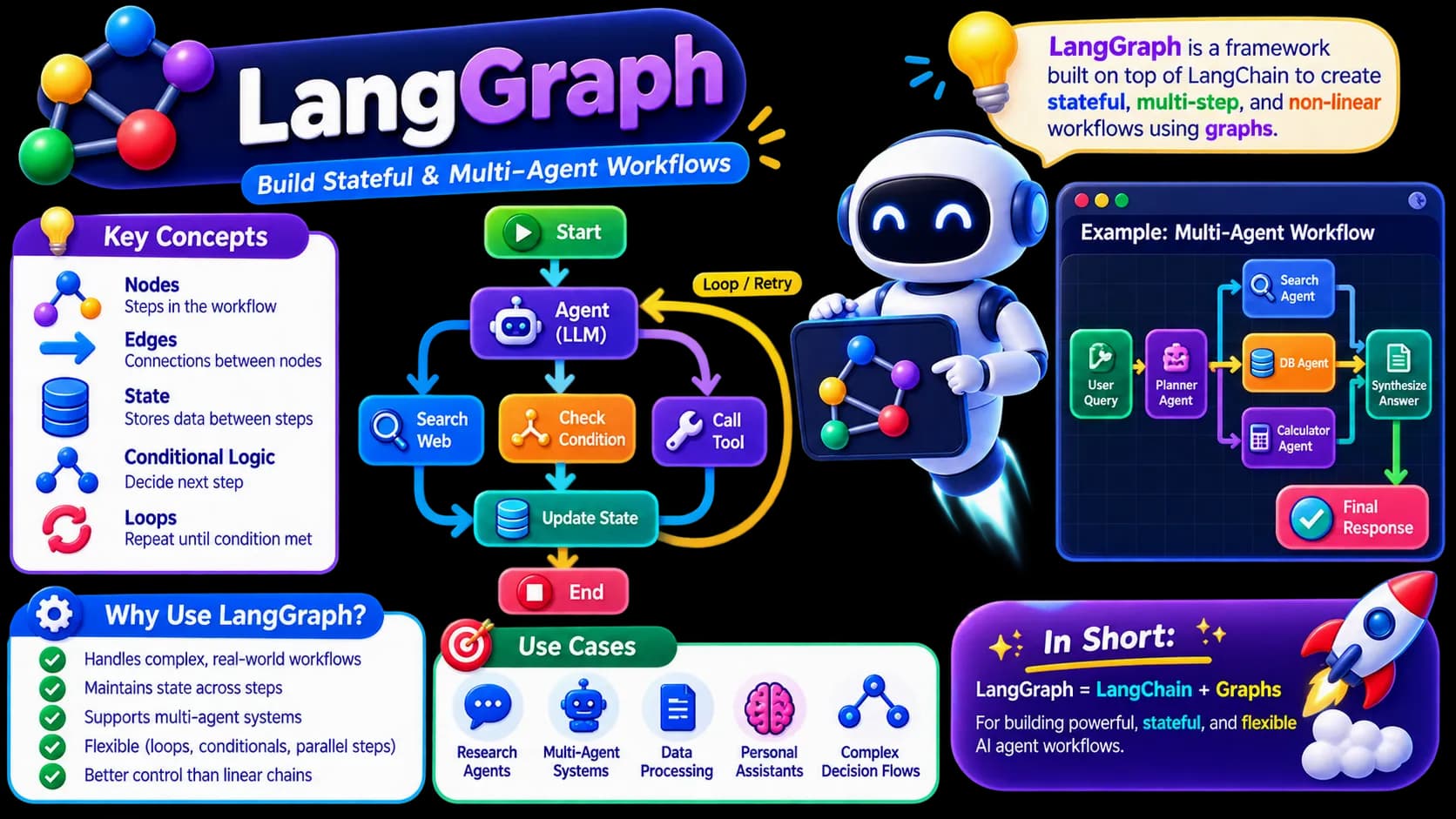
LangGraph is an extension of LangChain designed specifically for building stateful, multi-agent applications. While classic LangChain excels at linear, step-by-step workflows (Directed Acyclic Graphs, or DAGs), real-world agentic workflows are rarely linear. They require loops, cycles, and persistent memory.
Imagine an AI agent writing code. It writes a script, runs a test suite, encounters an error, feeds that error back into the LLM, rewrites the script, and tries again. This loop continues until the test passes. LangGraph makes this cyclical behavior possible by modeling your application as a graph with nodes (actions or LLM calls) and edges (decisions), all while maintaining a centralized state.
LangSmith is a commercial SaaS platform designed for debugging, testing, evaluating, and monitoring LLM applications. When you build an AI application, it behaves like a black box. You send a prompt, and a response comes back. But if the response is bad, where did it go wrong? Did the retriever fetch the wrong document? Did the prompt template format incorrectly? Did the LLM hallucinate?
What is LangGraph?
LangSmith shines light into this black box. It hooks directly into LangChain and LangGraph to record every single run, showing you the exact inputs, outputs, latency, token usage, and intermediate steps of your chains. It acts as your production-grade APM (Application Performance Monitoring) tool for AI.
What is LangSmith?
Comparing LangChain, LangGraph, and LangSmith
 Hover to zoom
To help you quickly identify which tool fits your current engineering challenge, we have mapped out their core differences across key development dimensions:
| LangChain / LangGraph (Development) | LangSmith (Operations) | |
|---|---|---|
| Primary Purpose | Building and orchestrating LLM workflows and agent logic. | Debugging, testing, and monitoring LLM workflows. |
| Execution Flow | Linear (LangChain) or Cyclical/Looping (LangGraph). | Observability layer; does not execute code logic. |
| State Management | Maintained across nodes in LangGraph for complex agents. | Records and visualizes state transitions post-execution. |
| Pricing Model | Open-source and free to use under MIT license. | Commercial SaaS with a free tier and pay-as-you-go pricing. |
Understanding these boundaries early prevents the classic trap of trying to build cyclical agent loops using basic sequential chains.
A Real-World Example: The Automated Travel Planner
Let us look at a practical scenario to see how these three tools collaborate. Imagine you are building an Automated Travel Planner application.
- LangChain's Role: It acts as the interface. You use it to connect to GPT-4o, load flight data from an API using a custom tool, and format the user's travel preferences into a structured prompt.
- LangGraph's Role: It manages the complex agent logic. The planner agent drafts an itinerary (Node A). A budget validator agent checks the costs (Node B). If it is over budget, an edge routes the draft back to the planner agent to find cheaper hotels (Cycle). This loop runs until the itinerary fits the budget.
- LangSmith's Role: It runs behind the scenes. If a user complains that their itinerary took 45 seconds to generate, you open LangSmith. You instantly see that the flight API tool took 40 seconds to respond, allowing you to optimize that specific API call rather than guessing what went wrong.
How to Build a Simple State Graph in LangGraph
To understand how LangGraph differs from standard sequential chains, look at this basic Python implementation. Here, we define a simple stateful graph where a node processes a message and decides whether to end the run or continue.
from typing import TypedDict, Annotated, Sequence
from langgraph.graph import StateGraph, START, END

# Define the state that will be passed between nodes
class AgentState(TypedDict):
    messages: list[str]
    needs_revision: bool

# Define our first node: The Writer
def writer_node(state: AgentState):
    print("--- Writer Node ---")
    # In a real app, this would call an LLM
    new_messages = state["messages"] + ["Drafting the article content..."]
    return {"messages": new_messages, "needs_revision": True}

# Define our second node: The Editor
def editor_node(state: AgentState):
    print("--- Editor Node ---")
    new_messages = state["messages"] + ["Revising content to meet quality guidelines."]
    return {"messages": new_messages, "needs_revision": False}

# Define conditional routing logic
def route_after_edit(state: AgentState):
    if state["needs_revision"]:
        return "editor"
    return END

# Build the graph
workflow = StateGraph(AgentState)

# Add nodes to the graph
workflow.add_node("writer", writer_node)
workflow.add_node("editor", editor_node)

# Define edges
workflow.add_edge(START, "writer")
workflow.add_edge("writer", "editor")

# Add a conditional edge (looping capability)
workflow.add_conditional_edges(
    "editor",
    route_after_edit,
    {
        "editor": "editor",
        END: END
    }
)

# Compile the graph into an executable application
app = workflow.compile()
print("Graph compiled successfully!")Which One Do You Actually Need?
Your choice depends entirely on where you are in your AI development journey and the complexity of the application you are building.
- Choose LangChain if: You are building straightforward, linear applications. If you are constructing a standard RAG search tool, a document translator, or a basic chatbot, LangChain has all the integrations and utilities you need without extra complexity.
- Choose LangGraph if: You are building complex agents that need to make decisions, correct their own mistakes, or collaborate with other agents. If your application requires loops, persistent state, human-in-the-loop approvals, or multi-step reasoning, LangGraph is the right tool.
- Choose LangSmith if: You have any LLM application running in development or production and want to optimize it. You do not write your application logic in LangSmith; you use it to monitor and debug your existing LangChain or LangGraph code to cut down token costs and latency.
Where to go from here
If you are ready to move past basic prompting and build reliable multi-agent systems, explore our comprehensive Production-Grade Generative AI and Agentic AI Engineer Program. You will build production architectures, configure stateful graphs, and set up robust telemetry from scratch.
 Hover to zoom